

Download PageRank Status Extension – free Windows SEO tool for instant PageRank
Overview
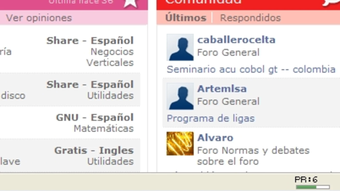
PageRank Status Extension is a lightweight, free Windows add‑on created by the SEO specialists at Pizza SEO. Designed for anyone who needs quick, reliable insight into a site’s authority, the extension lives in the upper‑right corner of your browser window and shows the current Google PageRank of the page you’re viewing. Because it updates automatically whenever you switch tabs, you never have to pause your research, open a separate tool, or copy‑paste URLs just to check a score.
The add‑on works with modern browsers that support extensions (such as Chrome, Firefox, and Edge) and consumes virtually no RAM or CPU, making it ideal for power users who keep dozens of tabs open while conducting keyword research, link‑building, or competitor analysis. Its core value proposition is speed: a one‑second glance tells you whether a page is likely to pass link equity, whether it’s a reputable source for citation, or if it might be a low‑quality link farm. For marketers, webmasters, and SEOs who regularly evaluate backlinks, the instant visibility of PageRank Status can shave hours off a typical audit workflow.
Moreover, because the tool is distributed by Pizza SEO—a brand trusted for transparent, no‑spam software—it feels secure to install, and updates are delivered through the browser’s native extension store, ensuring you always have the most recent PageRank data without manual patches.
Key Features of PageRank Status Extension
- Real‑time PageRank display: The current PageRank appears instantly in the corner of the browser, updating with each tab change.
- Tabbed browsing support: Works flawlessly with multiple open tabs, showing the correct score for the active page.
- Minimal system impact: Consumes less than 5 MB of RAM and negligible CPU, keeping your browsing experience smooth.
- Cross‑browser compatibility: Available for Chrome, Firefox, and Microsoft Edge via the respective web stores.
- Automatic updates: Receives seamless updates through the browser’s extension framework, ensuring the latest PageRank algorithm changes are reflected.
- Free and ad‑free: No hidden fees, no in‑app purchases, and no distracting advertisements.
- Simple UI design: A clean, non‑intrusive badge that blends with most browser themes and does not interfere with page content.
- Secure source code: Developed by Pizza SEO, the extension follows best practices for privacy and does not collect personal data.
Installation, Setup, and Daily Usage
Getting PageRank Status Extension up and running is as straightforward as any modern browser add‑on. First, navigate to the Chrome Web Store, Firefox Add‑Ons site, or Microsoft Edge Add‑Ons catalog and search for “PageRank Status Extension.” Click the Add to Chrome/Firefox/Edge button, and the browser will prompt you to confirm the installation. Once you accept, the extension downloads automatically, and a tiny badge appears in the upper‑right corner of the toolbar. No additional configuration is required; the extension detects your browsing context and begins displaying PageRank values immediately.
For power users who prefer a more customized experience, the extension offers a tiny settings menu (accessed by right‑clicking the badge). Within this menu you can toggle the visibility of the badge, choose between a dark or light icon to match your theme, and enable a brief tooltip that explains the numeric value when you hover over it. The settings are stored locally, so they persist across browser restarts.
Daily usage is intentionally frictionless. When you open a new tab and navigate to a website, the PageRank score appears in seconds. If you’re analyzing a list of URLs, simply copy each link into a new tab—no need to open a separate PageRank checker.
The extension also works with private/incognito windows, provided you enable it in the browser’s extension manager for those sessions. Because updates are delivered through the browser’s store, you’ll automatically receive new releases that reflect changes in Google’s PageRank algorithm or add minor UI improvements. In short, installation takes under a minute, configuration takes seconds, and the ongoing workflow is essentially hands‑free.
Compatibility, Pros & Cons, and Frequently Asked Questions
The extension is built for the Windows operating system and works with any recent version of Windows 10 or Windows 11. Because it runs inside the browser, the underlying OS version is less critical than the browser version; it supports Chrome 92+, Firefox 89+, and Edge 92+. Users on macOS or Linux can still benefit by installing the extension in the respective browsers on those platforms, as the code is platform‑agnostic.
Pros
- Instant visibility of PageRank without leaving the current tab.
- Zero cost and completely ad‑free.
- Lightweight footprint that does not slow down browsing.
- Automatic updates keep the data current.
- Secure development by a reputable SEO company.
Cons
- Only displays Google PageRank, which Google has officially deprecated for public use (the extension approximates the old values).
- Limited to Windows browsers; macOS users need to verify compatibility manually.
- No advanced analytics or historical tracking of PageRank changes.
Frequently Asked Questions
Is PageRank Status Extension safe to install?
Yes. The extension is published by Pizza SEO, a well‑known provider of SEO tools. It does not collect personal data, contains no malware, and is reviewed by the Chrome, Firefox, and Edge stores before publication.
Does the extension work on macOS or Linux?
While the official description targets Windows, the extension runs inside the browser, so it also works on macOS and Linux as long as you use a supported browser version.
Can I see historical PageRank values?
No. The tool only displays the current PageRank for the active page. For historical data you would need a dedicated SEO platform that stores rank history.
How often is the PageRank data refreshed?
The extension queries the most recent publicly available PageRank approximation each time you load a new page or switch tabs, so the value you see is effectively real‑time based on the last data pull.
Is there a paid version with more features?
Currently the extension is 100 % free and no premium tier is offered. Pizza SEO focuses on providing a simple, ad‑free utility without upsells.
Expert Review
Rating: ★★★★☆ (4 out of 5)
Summary: PageRank Status Extension delivers exactly what it promises—a quick, free glimpse at a site’s PageRank. Its speed and minimal footprint make it a solid addition to any SEO workflow, even though the underlying metric is no longer officially supported by Google.
Conclusion & Call to Action
If you spend any amount of time assessing link quality, competitor domains, or simply want to know whether a page you’re reading carries authority, PageRank Status Extension is a no‑brainer. Its free price tag, tiny resource usage, and instant badge make it one of the most convenient SEO utilities you can add to Chrome, Firefox, or Edge on a Windows machine. While it does not replace comprehensive SEO suites, it fills a niche that many professionals have long missed—a one‑click PageRank readout that fits seamlessly into daily browsing.
Ready to boost your workflow? Click the download button below to add PageRank Status Extension to your browser instantly. Experience the speed, security, and simplicity of having PageRank at your fingertips, and let the data guide smarter link‑building and content‑curation decisions.







